Home Features 📱 Apps 📊 Owner Dashboard Outlet Types Pricing Integrations 📰 Blog ▶️ YouTube 📖 Tutorials 🆘 Support 🚀 Changelog 🗺️ Roadmap 🤝 Partner Program Download About Us
Book a Demo →
📊 New · Owner Dashboard · Live & installable

Your whole restaurant,
live in your pocket

The Owner Dashboard is a read-only, real-time view of sales, profit, margins, payments and pending collections across every branch — installable to your home screen like an app. A dedicated owner view most POS platforms still don't offer.

Why it's different ↓
✓ Included in every plan  ·  ✓ Installs to home screen  ·  ✓ Read-only & safe to share
owner.restopos.in · Overview · all branches
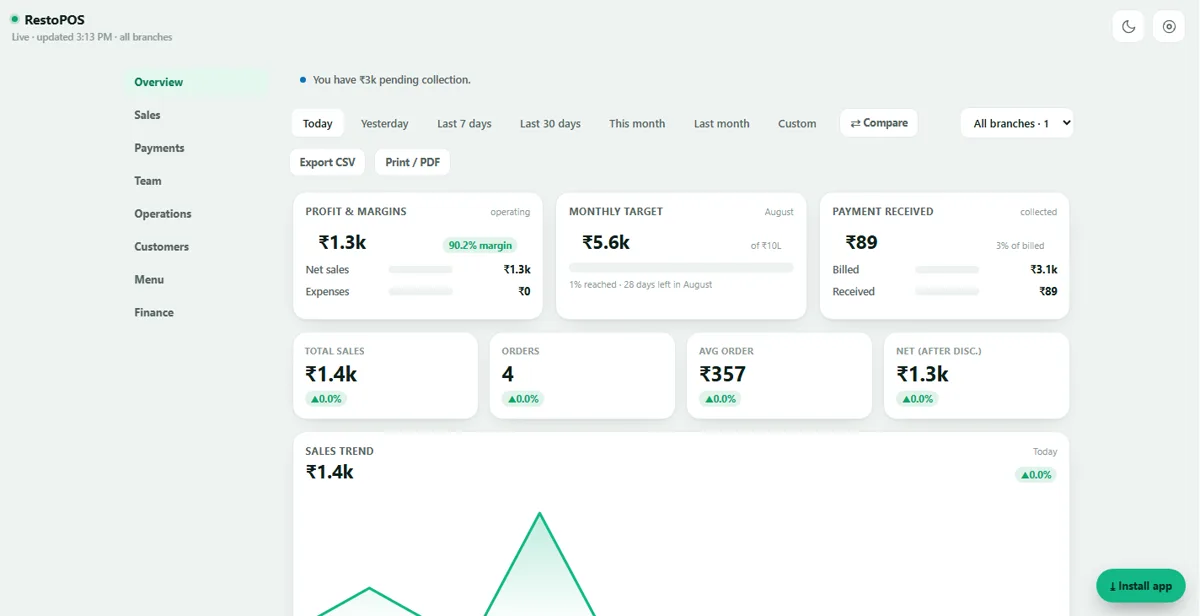
RestoPOS Owner Dashboard overview showing profit and margins, monthly target, payment received, total sales, orders and a live sales-trend chart across all branches
⚡ In short

The RestoPOS Owner Dashboard is a live, read-only owner view that shows sales, profit, margins, expenses, payments and pending collections across every branch on one screen. It installs to your phone's home screen, refreshes in real time, compares date ranges and branches, and exports to CSV or PDF — so you can run your restaurant from anywhere without ever touching the billing POS.

💰 Profit, not just sales

See what you actually make

Most dashboards stop at "total sales". This one leads with profit and margin %, tracks your monthly target as it fills, and flags pending collection right at the top — so the first thing you see is the number that matters.

  • Profit & margin % front and centre
  • Monthly target with a live progress bar
  • Total sales, orders, avg order & net after discount
Overview
Owner Dashboard overview cards: Profit & Margins with margin percentage, Monthly Target progress and Payment Received with a pending-collection alert
Sales · all branches
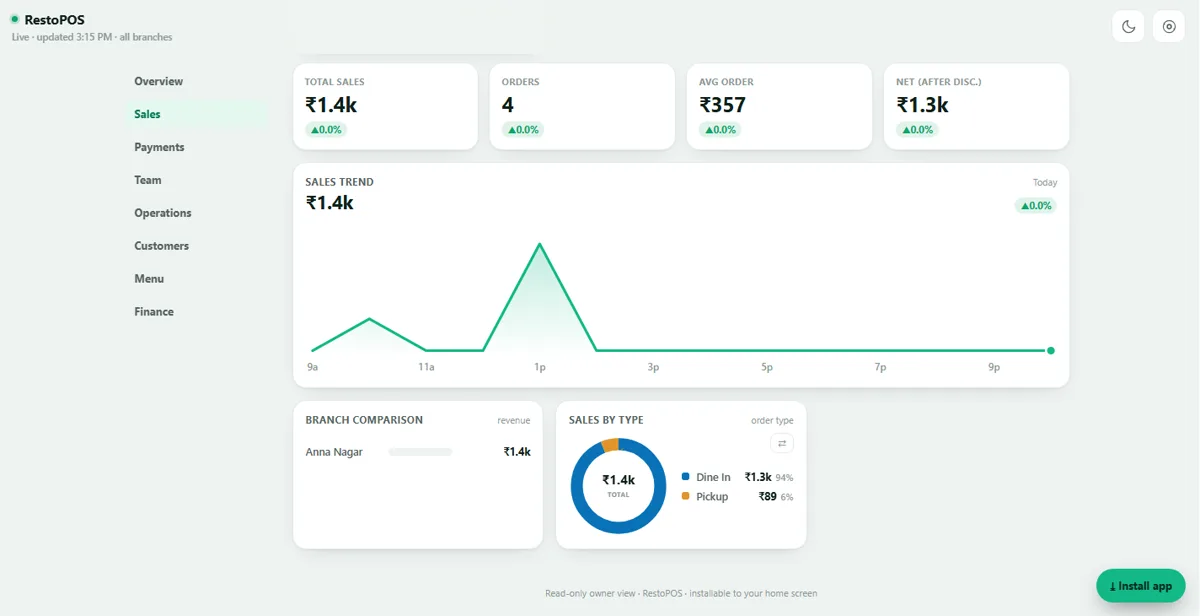
Owner Dashboard sales view with an hourly sales-trend line chart, branch comparison bars and a dine-in vs pickup donut chart
🏬 Every outlet, one screen

All your branches, live

See the whole group totalled by default, then switch to a single outlet or compare branches side by side. Watch the hourly sales trend, see which branch is pulling its weight, and split revenue by dine-in, pickup and delivery.

  • All-branches total or one outlet in a tap
  • Live hourly sales-trend chart
  • Revenue split by order type
🧾 Chase your money

Know exactly what's still owed

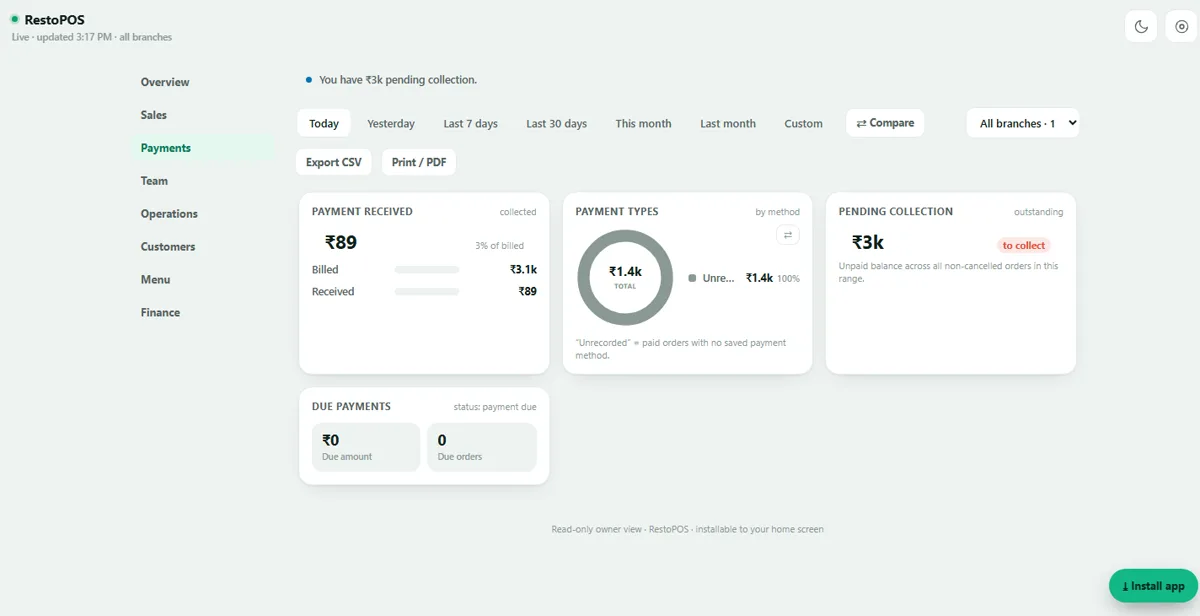
Billed vs actually received, a running pending-collection balance, due payments and a breakdown by payment method — so cash, UPI and card all reconcile, and nothing quietly slips through as "unrecorded".

  • Billed vs received, with % collected
  • Live pending-collection & due-payment totals
  • Payment-type mix at a glance
Payments
Owner Dashboard payments view: payment received vs billed, payment-type donut, pending collection to-collect balance and due payments
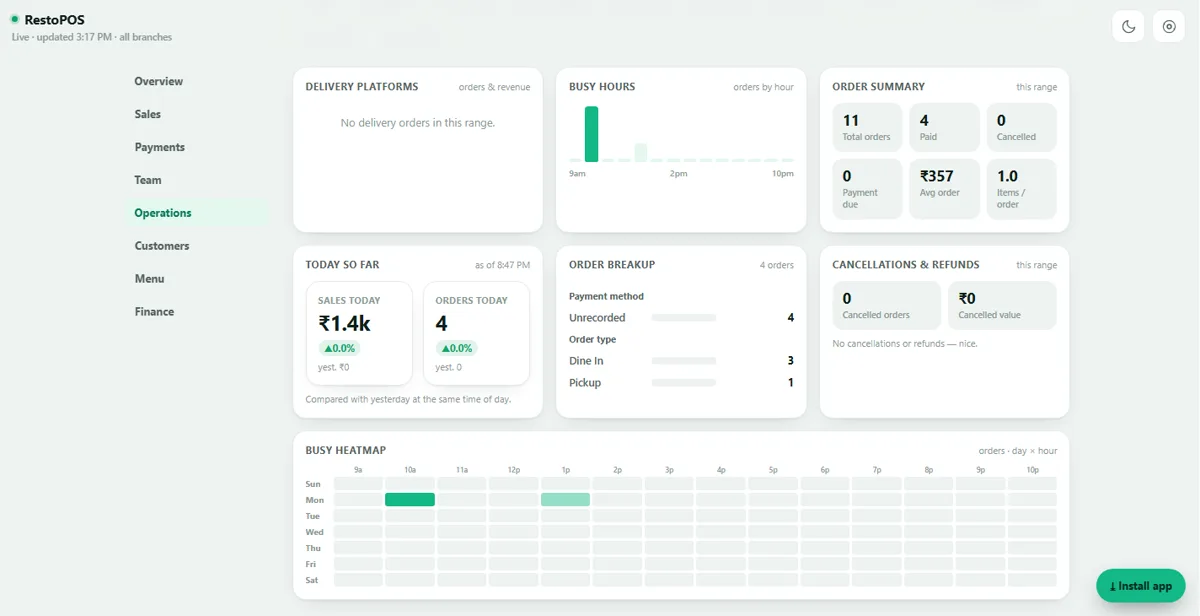
Operations
Owner Dashboard operations view: busy-hours bar chart, order summary, delivery platforms, cancellations and a day-by-hour busy heatmap
⏱️ Know your rush

Staff for the hours that matter

A busy heatmap by day and hour, live busy-hours bars, today-vs-yesterday at the same time of day, order breakup by type, delivery-platform performance and cancellations & refunds — the operational picture in one scroll.

  • Day × hour busy heatmap
  • Today vs yesterday at the same time
  • Cancellations, refunds & delivery mix
📉 True bottom line

Expenses, discounts & tax — accounted for

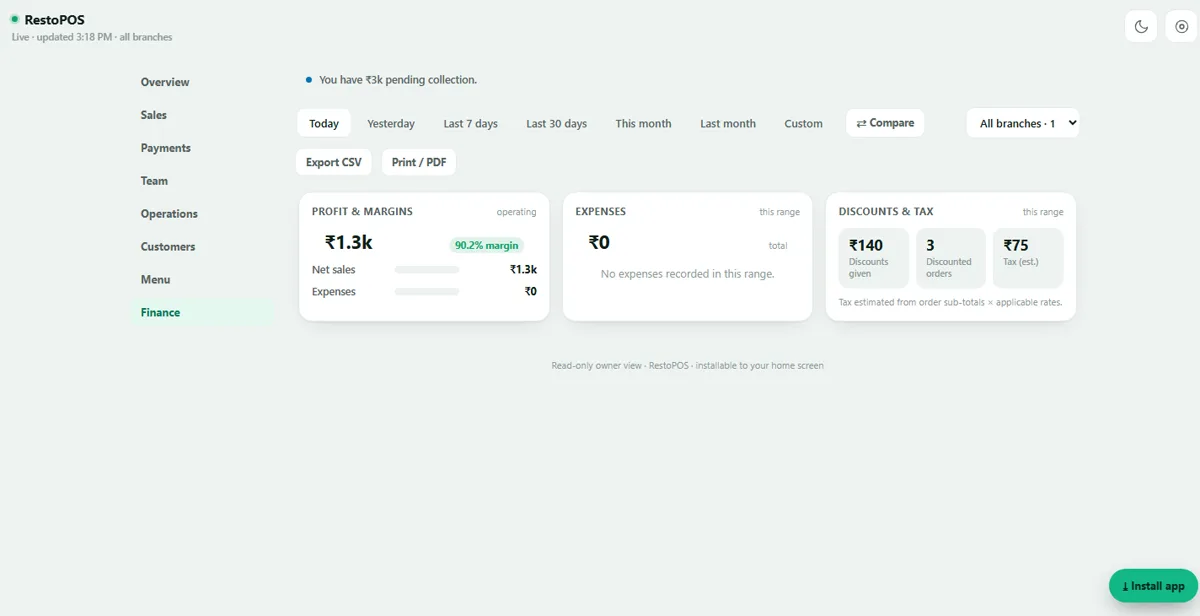
The Finance view pulls expenses, discounts and tax together with profit and margins, so the number you read is the number you keep. Filter any range — today, this month, last month or a custom window — and export to CSV or print a PDF for your accountant.

  • Profit, expenses, discounts & tax in one view
  • Any date range, with range-vs-range compare
  • One-tap CSV export & PDF print
Finance
Owner Dashboard finance view with Profit & Margins, Expenses and Discounts & Tax cards
The difference

A real owner app — not just a reports tab

Plenty of POS systems bury a few charts inside the admin panel. RestoPOS gives owners a dedicated, installable, read-only app built for one job: knowing how the business is doing, from anywhere.

📲

Installs to your home screen

A one-tap PWA install — no app store, no login every time. It sits on your phone like any app, with a built-in dark mode.

🔒

Read-only & safe to share

It can't touch orders, refunds or settings — so hand it to a partner, investor or accountant without any risk to live billing.

💹

Profit, not vanity metrics

Margin %, monthly target and pending collection lead the screen — the numbers owners actually lose sleep over.

🏬

Multi-branch by default

Your whole group in one total, or compare outlets and date ranges side by side — no exporting, no spreadsheets.

🔴

Live, not last-night's data

A "Live · updated 3:15 PM" pulse means the numbers move as orders come in — not a report you refresh tomorrow.

📤

Export & print anywhere

One tap sends any range to CSV or a clean PDF — ready for your accountant or your own records.

Every Owner Dashboard screen

Tap any screenshot to enlarge.

Owner Dashboard — Overview
Owner Dashboard — Sales
Owner Dashboard — Payments
Owner Dashboard — Operations
Owner Dashboard — Finance

Frequently asked questions

What is the RestoPOS Owner Dashboard?

It is a live, read-only owner view that shows sales, profit, margins, expenses, payments and pending collections across all your branches on one screen. It is designed for owners who want the numbers without touching the billing POS, and it installs to your phone's home screen like an app.

Does the Owner Dashboard show all my branches together?

Yes. It totals every outlet by default and lets you switch to a single branch or compare branches side by side, so you can see your whole business or drill into one location in a tap.

Can I install the Owner Dashboard on my phone?

Yes. It is an installable web app (PWA) — tap "Install app" and it lives on your home screen like any other app, with a dark mode, no app-store download required. It works on Android, iPhone and the web.

Is it read-only and safe to share with a partner or investor?

Yes. It is a read-only view — it cannot edit orders, refunds or settings — so you can safely give it to a business partner, investor or accountant to watch performance without any risk to your live billing.

Does it show profit and margins, not just sales?

Yes. Alongside total sales it shows profit, profit margin percentage, expenses, discounts, tax and net revenue — plus pending collection so you know exactly how much money is still to be recovered.
Run your restaurant from your phone —
book a free demo

The Owner Dashboard is included with every RestoPOS plan. Free onboarding, no setup fees, cancel anytime.

💬 WhatsApp Us